This document provides a high-level overview of how FlexSearch works with Web workers. You don't have to use FlexSearch with a Web worker, but creating search indexes and performing searchs are perfect use-cases for Web worker-based non-blocking asynchronous processing. A separate thread does the search index processing while the UI stays responsive.
Web workers offload work to a background thread
Web workers are scripts that runs on a thread separate from the main UI thread. Web workers run in the background allowing the main UI to keep the UI highly responsive.
Web worker considerations:
- Because they are non-blocking, Web workers perform things like sorting or image processing without making the page unresponsive. While a Web worker is performning asynchronous work, you don't use keywords such as
awaitorasyncwith worker methods. - Web workers live in their own scope and connect directly manipulate the DOM.
- The main script communicates with Web worker with a two-way messaging system which essentially provides a fire-and-forget, pub/sub-like messaging system.
- Web workers are implicitly asynchronous. Unlike standard asynchrony, which often pauses to keep the UI responsive, Web workers provide true parallelism running on their own thread (and potentially on a different CPU core).
- Once you master their simple messaging, Web workers are very easy to use. Despite their interesting runtime behavior, they remain plain ol' JavaScript/TypeScript.
- Don't confuse Web workers with service workers. The former is tied to a specific browser tab; if you close the browser tab the worker dies. The latter sits between your app, the browser, the network to enable services such as offline support (WWPAs), caching, and push notifications.
Debugging Web workers
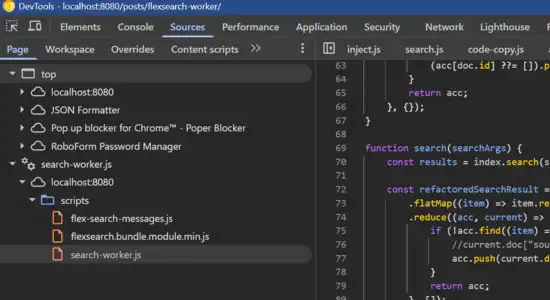
You can debug Web workers with Chrome and FireFox dev tools just like you can with regular client JavaScript. The only difference is that workers are shown in a different part of the asset tree. Towards the bottom of the tree, you'll see Web workers listed separately.
FlexSearch Web worker sequence diagram
The chart below shows the sequence of runtime operations to create and search a FlexSearch index. Processes performed in the worker are done on a thread other than than the main UI thread. The index is created in the background, in memory.
Because FlexSearch is 100% client-based, the search index is recreated on each page load. While that seems iffy, it's not. FlexSearch indexed 5000 markdown documents is less that 2/3 of a second. Read more about FlexSearch indexing and performance TODO LINKS
FlexSearch has a new feature called persistent searches which pushes FlexSearch towards being a self-hosted Algolia-like alternative. Read more about it here.
The sequence diagram shown in Figure 2 shows a way to use a Web worker with FlexSearch in a Web application.
The sequence diagram steps:
- When a page is loaded, the client-side
search.jsfile sends a CREATE_INDEX message to the Web workersearch-worker.js. - The Web worker creates the index (in less than a second).
- The worker sends a INDEX_READY message.
- A user makes a search request.
- The
search.jsfile sends a SEARCH_INDEX message to thesearch-worker.jsfile. - The worker intiates the search.
- The worker receives the search results.
- The worker sends a SEARCH_RESULTS message to
search.js.. - Upon receiving the SEARCH_RESULTS message,
server.jsrenders the search results to the user.
The sequence diagram's (slightly) abstracted code
Coding note: I vastly prefer to use TypeScript in my projects. This code was developed originally for use with this Eleventy site, so I held my nose and wrote JavaScript.
Web workers send and receive messages with the client-side code. Create meaningful message names needed for your logic. To keep message processing very clear for this project, flex-search-messages.js defines the Web worker messages that FlexSearch needs. These message constants are used in both the Web worker and the standard client side JS.
export const CREATE_INDEX = "create_index";
export const INDEX_READY = "index_ready";
export const SEARCH_INDEX = "search_index";
export const SEARCH_RESULTS = "search_results";
The code in figure 4 below corresponds to the sequence diagram's "worker" column. This code provides the worker message handler. It has two tasks:
- Create the index
- Search the index
These two tasks are all done on the worker side in their own thread.
The search-worker.js example presented here is abstracted a bit to keep things simple. This explanation focuses on the worker and its messaging. FlexSearch's Document object provides the indexing and searching logic. The worker code below isn't syntactically a class, it behaves a little like one. It is instanced and it uses self to post messages to itself.
The code provided in Figures 3 and 4 below is to help you get a general idea of how FlexSearch works. The articles Creating a FlexSearch index and Performing a search with FlexSearch provide the exact code needed.
The worker message handler receives two arguments:
type— this a string value and indicates the type of message received.data— this is an object and provides search arguments for the search.
The worker creates and populates the when index type is FlexSearch.CREATE_INDEX. The index is a new instance of the FlexSearch's Document object. Its constructor arguments and how the index is populated is covered in this article.
A search is performed when type is FlexSearch.INDEX_READY. The search arguments are provided through the data argument. They include the search team and other meta data about the search. Read more about this TODO: link
FlexSearch's search results need a little massaging before passing them to your UI— the raw Json received needs a little restructuring.
That detail is hand-waved alway below with ... transform searchResults. and covered in this article. TODO-addlink
import { Document } from "/scripts/flexsearch.bundle.module.min.js";
import * as FlexSearch from "./flex-search-messages.js";

let index = null;

self.addEventListener("message", async (event) => {
    const { type, data } = event.data;

    switch (type) {
        case FlexSearch.CREATE_INDEX:    // Received CREATE_INDEX message.
            index = new Document({...})

            ..populate index

            self.postMessage({ type: FlexSearch.INDEX_READY }); // Sent INDEX_READY message.
            break;

        case FlexSearch.SEARCH_INDEX:    // Received SEARCH_INDEX message.
            const searchResults = index.search(data.payload);

            ... transform searchResults

            self.postMessage({ type: FlexSearch.SEARCH_RESULTS,
                               data: searchResults }); // Sent SEARCH_RESULTS message.
            break;
    }
});
This code in figure 5 below corresponds to the sequence diagram's "client" column. It is included in every page. It runs on the UI thread and sends and receives messages to the worker. While abridged (and with a few details omitted for now), this code, in conjunction with the search-worker.js code above, is the abstacted code that corresponds to the sequence diagram above.
The indexReady variable isn't user in this code. It is used later in the logic to ensure the index is ready before trying to perform a search.
import * as FlexSearch from "./flex-search-messages.js";

const worker = new Worker("/scripts/search-worker.js", { type: "module" });

// UI input element for value to search.
const input = document.getElementById("search-input");

let indexReady = false;

worker.addEventListener("message", (event) => {
    const { type, searchResults } = event.data;

    switch (type) {
        case FlexSearch.INDEX_READY:       // Received INDEX_READY message.
            indexReady = true;

        case FlexSearch.SEARCH_RESULTS:    // Received SEARCH_RESULTS message.
            // Json array of searchResults.
            renderResults(data);
    }
});

input.addEventListener("input", () => {
    // Fetch value to query from UI input element.
    const query = input.value.trim();

    if (!query || !indexReady) return;

    const searchArgs = {query};

    if (!query || !indexReady) return;

    worker.postMessage({ type: FlexSearch.SEARCH_INDEX, // Send SEARCH_INDEX message.
                         data: { searchArgs } });
})
Next up: Creating a FlexSearch index